

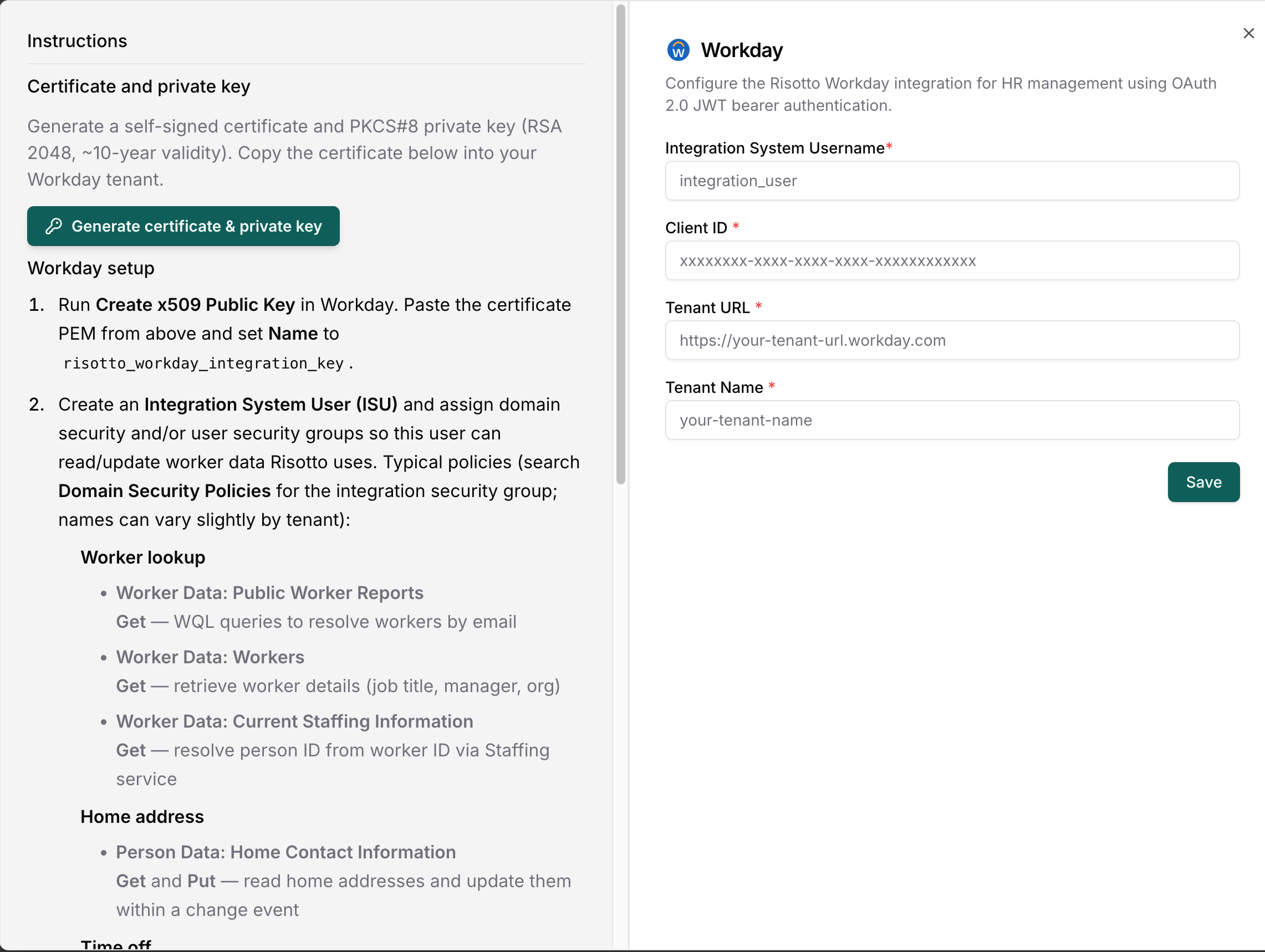
Required Information
To connect Workday, provide:- Tenant URL: Your Workday tenant URL
- Tenant Name: The name of your Workday tenant
- Client ID: The API client ID
- ISU Username: The Integration System User account Risotto will authenticate as
- X.509 Public Key: Generated from the Risotto dashboard and uploaded to Workday
ISU Security Configuration
The ISU must have domain security in Workday, and the API client must have matching functional area scopes. Without these, Risotto cannot read or write the corresponding worker data, even if the action is toggled on in the dashboard.Domain Security Policies
Assign these to the ISU’s integration security group. Domain names can vary slightly by tenant, search Domain Security Policies in Workday for the closest match. Worker lookup
Personal data
Home address
Time off and absence
API Client Scopes
When you register the API client in Workday, grant these functional areas:- Staffing: worker lookup, initiate home contact information changes
- Personal Data: read personal information
- Contact Information: read and update home addresses
- Time Off and Leave: PTO balances, time off entries, eligible types, and time off requests
- Absence Management: PTO balances and time off requests
- System: WQL support and REST API routing
- Tenant Non-configurable: global scope required for WQL and People resources